Facebook scheduler
Schedule Facebook posts to every Page
Plan a week of Facebook in one sitting. Write your posts, drop everything on the calendar, and Lemonpost publishes it automatically to your Pages through the official Facebook API. Even while you sleep.
Every Facebook format, scheduled
If you can post it on your Facebook Page, you can schedule it in Lemonpost.
Posts and photos
Schedule text updates, links, single photos or up to 10 images in one post. Everything your Page runs on, planned in advance.
Reels
Schedule Facebook Reels with their own title, separate from the caption. Reels are where Facebook is pushing the most reach right now.
Stories
Queue Stories next to your feed posts so your Page stays active every day, not just the days you remember to post.
First comment
Auto-post a first comment the second your post goes live. Handy for links, sources, or a call to action you'd rather keep out of the main post.
Four steps
How to schedule Facebook posts
- 1
Connect your Facebook Page
Link your Facebook Pages in a couple of clicks. Lemonpost publishes through the official Facebook API, so your account stays safe. Manage several Pages? Pick which one each post goes to.
- 2
Create your post
Write your post in Lemon Studio, add photos or video, and pick a format: post, Reel, or Story. You can even draft posts from Claude or ChatGPT.
- 3
Pick a time
Drop the post on your calendar, or add it to the queue and let it fill your schedule. Analytics shows when your followers are actually online.
- 4
Let it publish
Lemonpost posts it for you, first comment included. Then track how it did and reply to comments and messages without opening the app.
One place for Facebook
Built for how you actually post
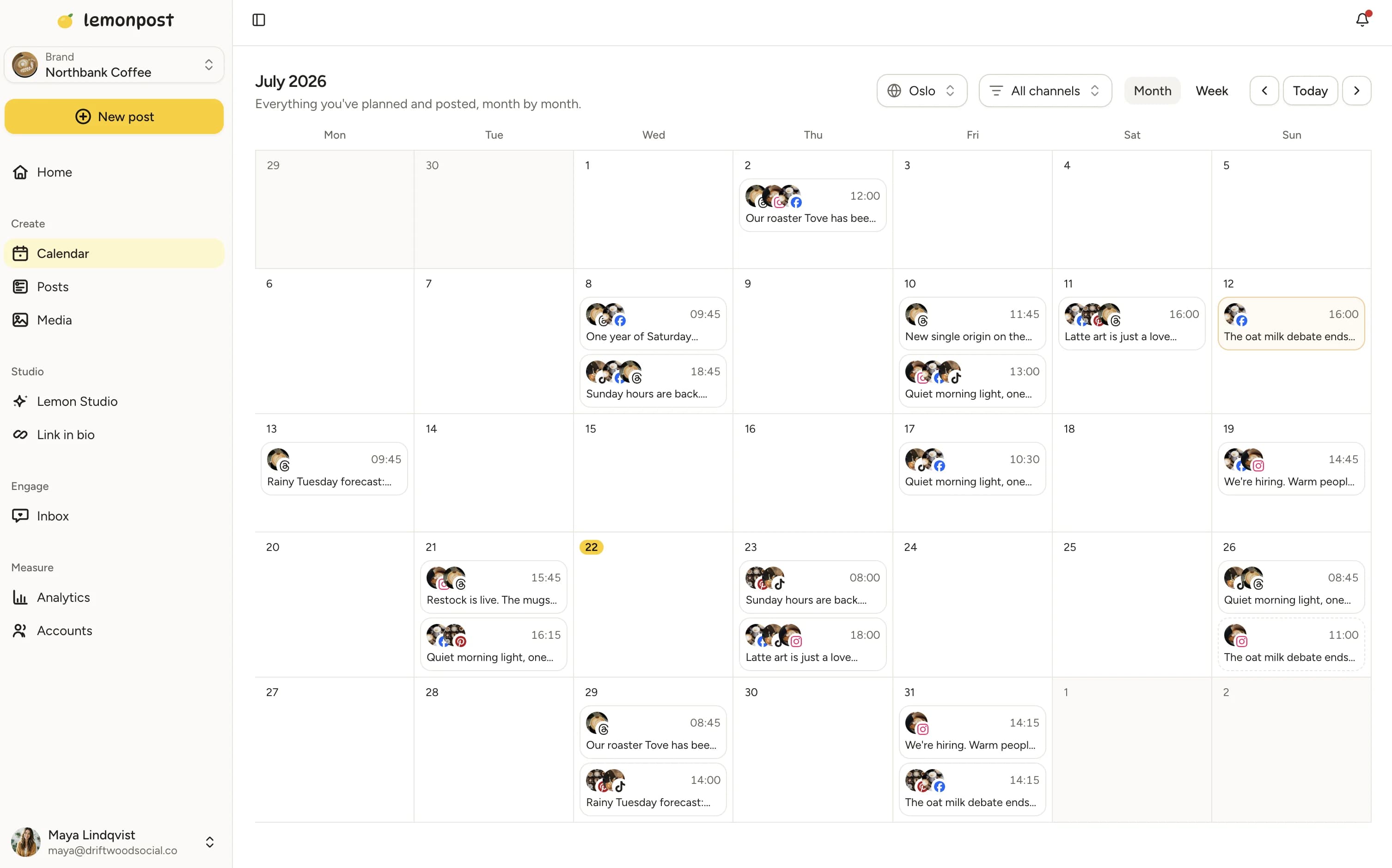
Content calendar
See your whole month in one view
Plan feed posts, Reels and Stories side by side, across every Page. Gaps are obvious, so you fix them before they turn into quiet weeks.
Drag and drop. Move a post to a new day and it's rescheduled. No forms, no fuss.
Queue it. Set your posting times once and Lemonpost slots new posts into the next open spot.
Every Page together. All your Facebook Pages, plus every other platform, on the same calendar.
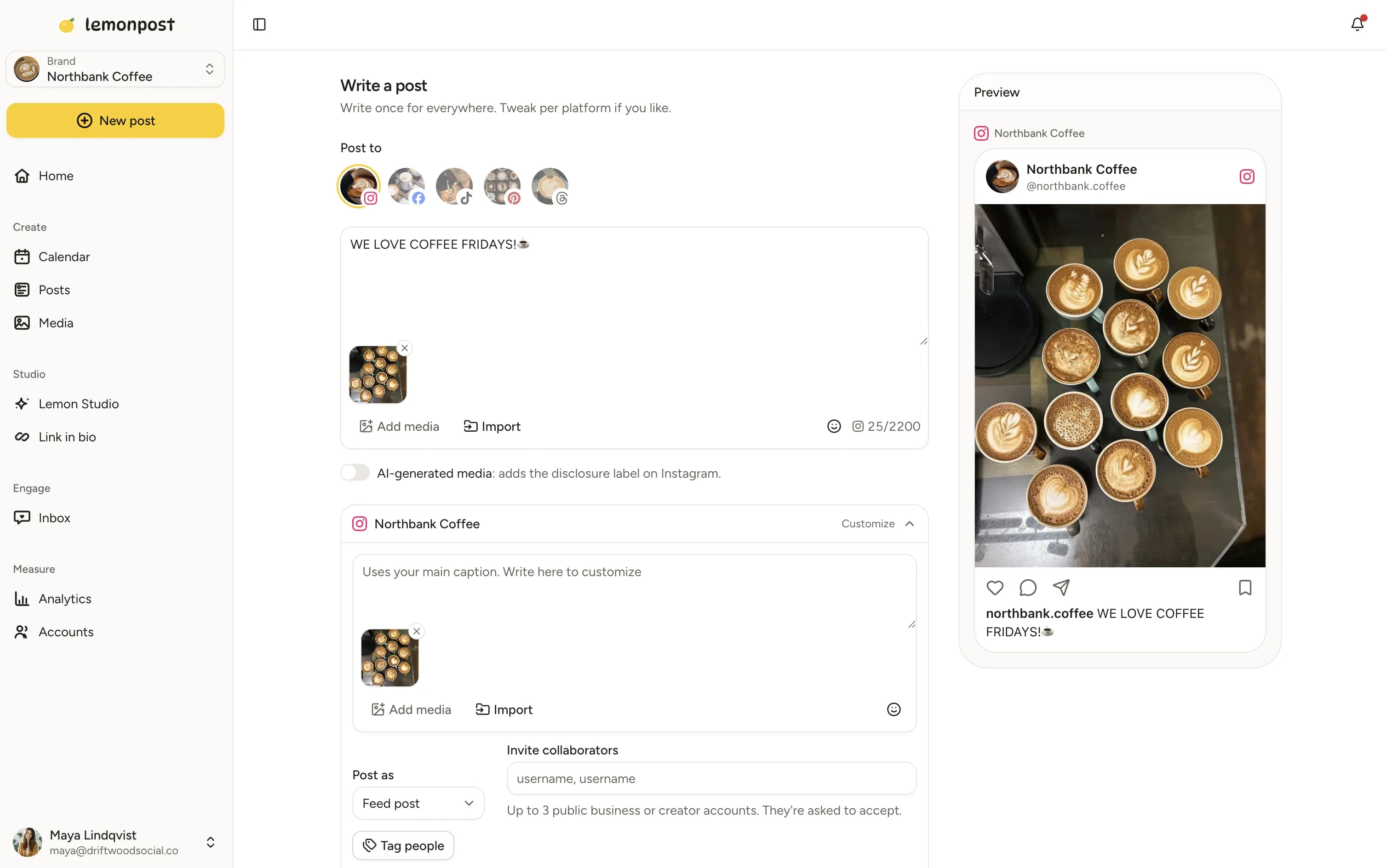
Lemon Studio
Write once, post everywhere
Compose your Facebook post, then send the same post to Instagram, TikTok, LinkedIn and more. Tweak each version in one screen.
Per-platform tweaks. Different caption, different first comment, even different media for each platform.
AI when you want it. Draft posts with AI, or publish straight from Claude, ChatGPT, or any MCP client.
Approvals built in. Send posts for sign-off before they go live. Handy for teams and client work.
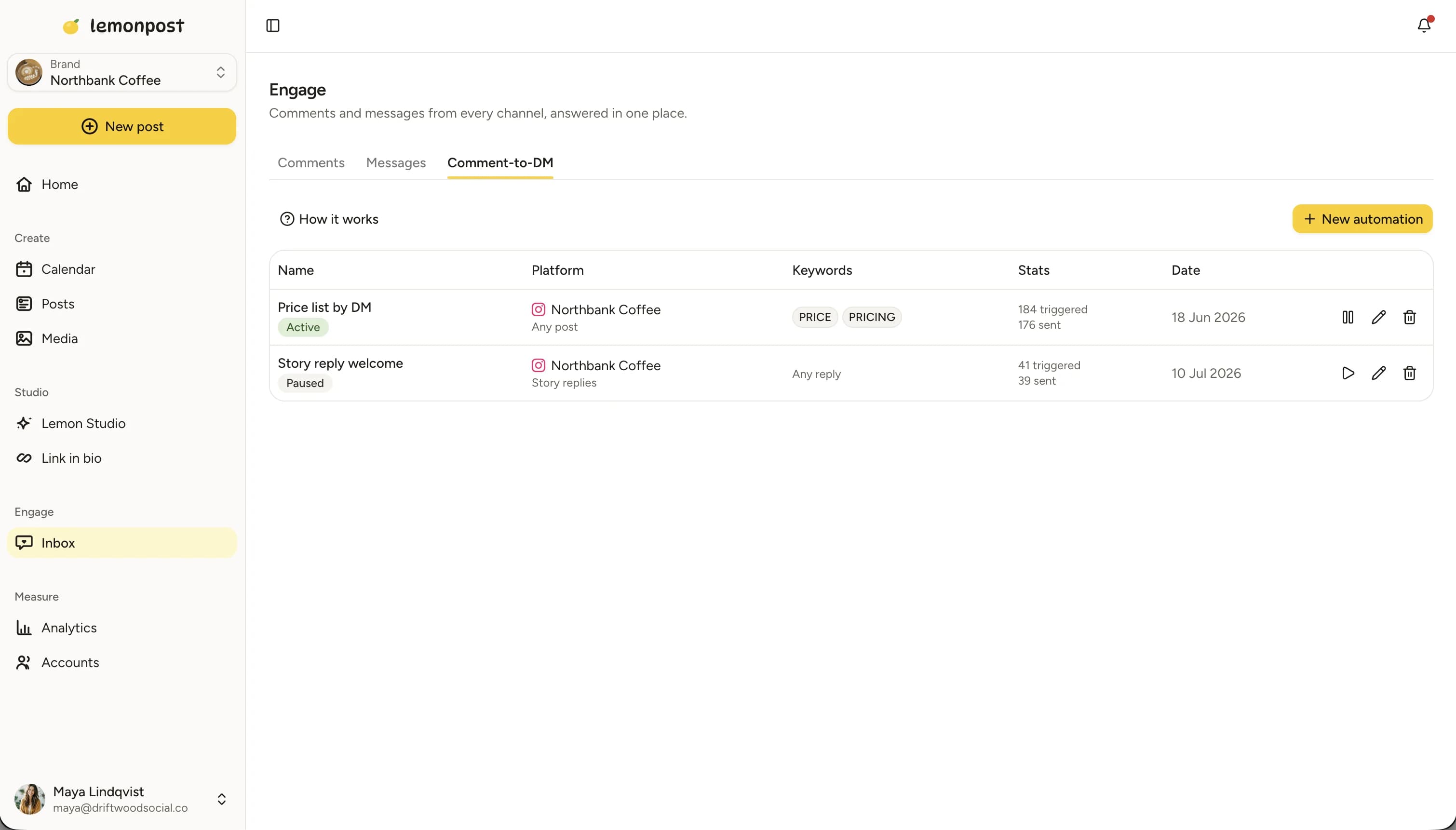
Engage inbox
Turn comments into DMs, automatically
Engage pulls your Facebook comments and messages into one inbox. Set up comment-to-DM automations like "comment LINK and I'll send it to you" and let them run.
One inbox. Comments and messages from every Page and account, together in one place.
Comment-to-DM automations. Answer a keyword comment with an automatic message, the same idea that works so well on Instagram.
Reply faster. Answer everything from Lemonpost instead of hopping between apps.
Why schedule Facebook posts in advance?
Posting in the moment sounds nice until it's 9 pm and the Page hasn't been touched all day. Scheduling turns Facebook from a daily chore into a weekly session: you batch your content when you have the energy, and Lemonpost handles the publishing.
A quiet Page looks like a closed business
For a lot of people, your Facebook Page is the first place they check to see if you're still around. A Page that hasn't posted in weeks sends the wrong message. Scheduling keeps it active through busy weeks and holidays, so anyone who lands on it sees a business that's clearly open and paying attention.
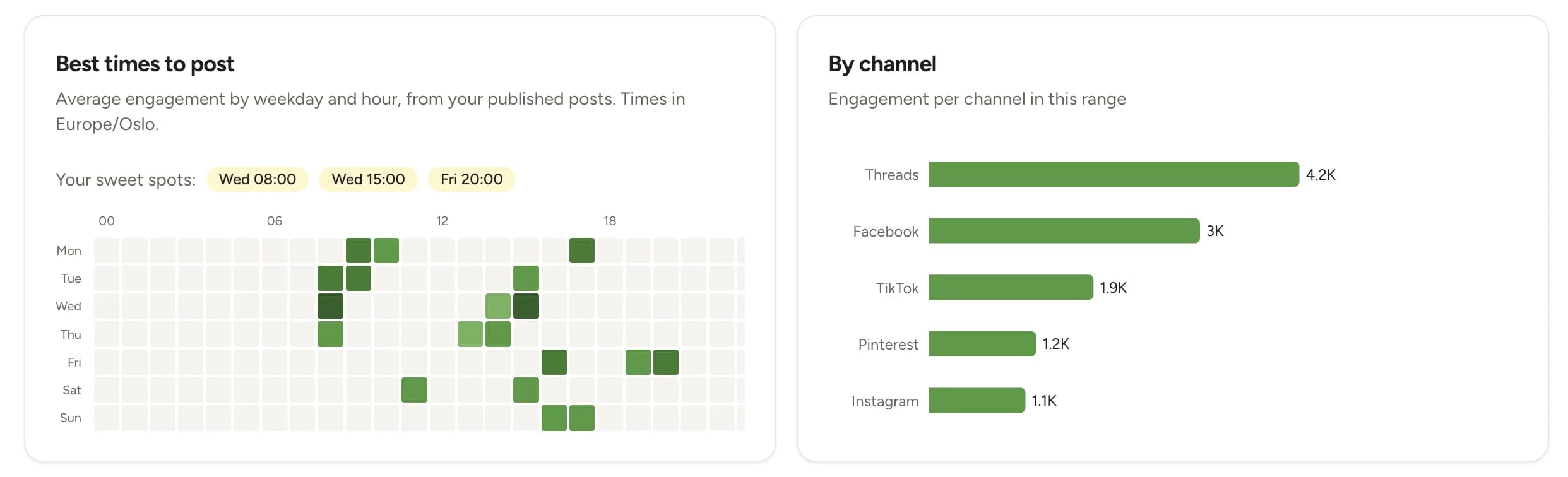
Post when your followers are online
There's no magic hour that works for every Page. Your best time to post is when your own audience is active, and that's different for a local shop and a national brand. Lemonpost's analytics shows your best posting times per channel, so you schedule into real windows instead of guessing from generic charts.
Scheduling doesn't cost you reach
Posts published through the official Facebook API are treated exactly like posts published from the app. Meta's own Business Suite schedules the same way. What moves your reach is posting content people react to and comment on, and posting it often enough to matter. A scheduler helps with the consistency and frees up time for the content.
Facebook sizes and specs, at a glance
What Facebook accepts for each format. Worth bookmarking.
| Format | Recommended size | Aspect ratio | Good to know |
|---|---|---|---|
| Feed photo (square) | 1080 × 1080 px | 1:1 | Safe default that looks right on desktop and mobile. |
| Feed photo (portrait) | 1080 × 1350 px | 4:5 | Takes up more space in the mobile feed, so it tends to catch more eyes. |
| Link / landscape image | 1200 × 630 px | 1.91:1 | The standard link-preview size. Good for shares that link out. |
| Multi-photo post | Same as feed photos | 1:1 or 4:5 | Up to 10 images in a single post. |
| Reel | 1080 × 1920 px | 9:16 | Full-screen vertical. You can set a separate Reel title in Lemonpost. |
| Story | 1080 × 1920 px | 9:16 | Full-screen vertical, disappears after 24 hours. |
- File types: JPG or PNG for photos, MP4 or MOV for video.
- Captions have plenty of room, but the first couple of lines are what show before the See more fold. Lead with the point.
- Managing several Pages? Lemonpost pulls them from Facebook so you pick which Page each post goes to.
Post to every platform, not just Facebook
Lemonpost publishes to Facebook, Instagram, TikTok, LinkedIn, X, Threads, Bluesky, Pinterest and YouTube. Write your post once, customize it per platform, and fill nine calendars in the time one used to take.
Who schedules Facebook with Lemonpost?
Customer story
How a small team posts daily across six platforms

- weekly time spent on posting
- 8 hrs → 2 weekly time spent on posting
- posts across 6 platforms, up from 1–2 a week
- Daily posts across 6 platforms, up from 1–2 a week
- follower growth over 12 months
- +321% follower growth over 12 months
Read the full story“Honestly, I thought cheaper meant worse. It didn't. It just did the one thing we actually needed.”
Georg Groth, Head of Marketing, Klaro
Loved by customers
Don't just take our word for it
“I looked for this in three other tools before Lemonpost. It just works, erik on support is also amazing.”
Elliot Solberg
Sandra Clothing AS
“We use Lemonpost with claude ai and love it. It is budget friendly, super easy to use and me and my cofounder use it daily.”
Henriette L. Solstad
Lett Rekruttering AS
“In our company it's active recruitment through social media, and being able to post across channels in one place and engage has been amazing.”
Serpios Dento
HomeProject Technologies Ltd
“We were spending HOURS trying to keep up with social media. Lemonpost made it fun again!! Highly recommended :-)”
Vera Bergh
Social media manager
“We manage a busy account and needed something that could take the load without falling over. Lemonpost handles it, and the team ships fixes fast.”
Theo Skyner
CoCreate Ltd
“Connected all our socials in one sitting. The value for money is honestly the best I've found, and support actually replies like a human.”
Ana Costa
“Best quality/price out of all the platforms I've tried.”
Fanny Mäkelä
Social media manager
“We launched a product and got literally zero traffic. It's now been 5 months and we're consistently launching content — and I love the DM feature so we can give our audience some free value.”
Fredrik Kreim
Good to know
Facebook scheduling, answered
Connect your Facebook Page, create your post in Lemonpost, and pick a date and time. Lemonpost publishes it automatically through the official Facebook API. You can schedule days, weeks, or months ahead, as far out as you like to plan.
Yes. Lemonpost schedules feed posts, multi-photo posts, Reels, and Stories. Reels can have their own title separate from the caption, and everything lands on the Page you choose.
Yes. Lemonpost pulls every Page your account manages straight from Facebook, so you choose which Page each post goes to when you schedule it. Run one Page or twenty, it's the same flow.
It is when the tool publishes through Facebook's official API, which Lemonpost does. You connect through Facebook's own login, we never ask for your password, and scheduled posts follow the same rules as posts made in the app.
No. Posts published through the official API are treated exactly like posts published by hand. Meta's own Business Suite schedules the same way. What moves your reach is posting engaging content consistently, which is exactly what a scheduler helps with.
Whenever your audience is online, which is different for every Page. Lemonpost's analytics shows your best posting times per channel based on your own followers, so you can schedule into those windows instead of guessing from generic charts.
Yes. Write it when you compose the post and Lemonpost publishes it right after the post goes live. People use it for links, sources, or a call to action they'd rather keep out of the main post.
Yes. Instead of scheduling it live, you can save a post to your Page's Publishing Tools as an unpublished draft, then review and post it from Facebook when you're ready.
Meta Business Suite is free and fine if you only post to Facebook and Instagram. Lemonpost covers nine platforms in one composer and adds a queue, approvals, a unified inbox with comment-to-DM automations, and posting from AI assistants like Claude and ChatGPT.
Yes. Every plan covers multiple connected accounts and Pages: 5 channels on Creator, 15 on Growth, and 40 on Pro, across all platforms. Workspaces keep brands or clients separate, and every plan has unlimited seats.
Yes. Every plan starts with a 7-day free trial and you can cancel anytime. Plans start at $29 a month, and you pay for connected channels, nothing else. Seats are unlimited on every plan.
Yes. Lemonpost runs in your browser and installs on your phone like a regular app. And since publishing happens on our servers, your phone doesn't need to be on when the post goes out.
It stays in your queue marked as failed, with the reason from Facebook, so you can fix it and try again. If you cross-post to several platforms and one fails, the others still go out. Only the failed one waits for you.
Fill next week's Facebook calendar today
Batch your posts, Reels and Stories in one sitting, then get back to your real work. Lemonpost squeezes more out of every posting session.