Social media scheduler
The social media scheduler that doesn't count your team
Plan a week of posts for nine platforms in one sitting. Client approvals, white-label reports, and posting from Claude or ChatGPT, with unlimited seats on every plan.





Loved by 1,689+ happy customers 💛
 4.9/5 on G2
One scheduler, nine platforms
Write the post once, then adjust the caption, media, or first comment for each network before it goes out. Every platform publishes through its official API.
Four steps
How to schedule social media posts
- 1
Connect your accounts
Link each social account once. Every plan covers several: 5 on Creator, 15 on Growth, 40 on Pro.
- 2
Write the post once
Add your caption and media in Lemon Studio, then tweak the text, images, or first comment per platform if you want to.
- 3
Pick a time or use the queue
Drop it on the calendar, or set your posting slots once and let new posts fill the next open one.
- 4
Let it publish
Lemonpost checks the post against each network's rules, publishes it on time, and shows you how it performed.
What you get
Built for the people who post every week
Content calendar
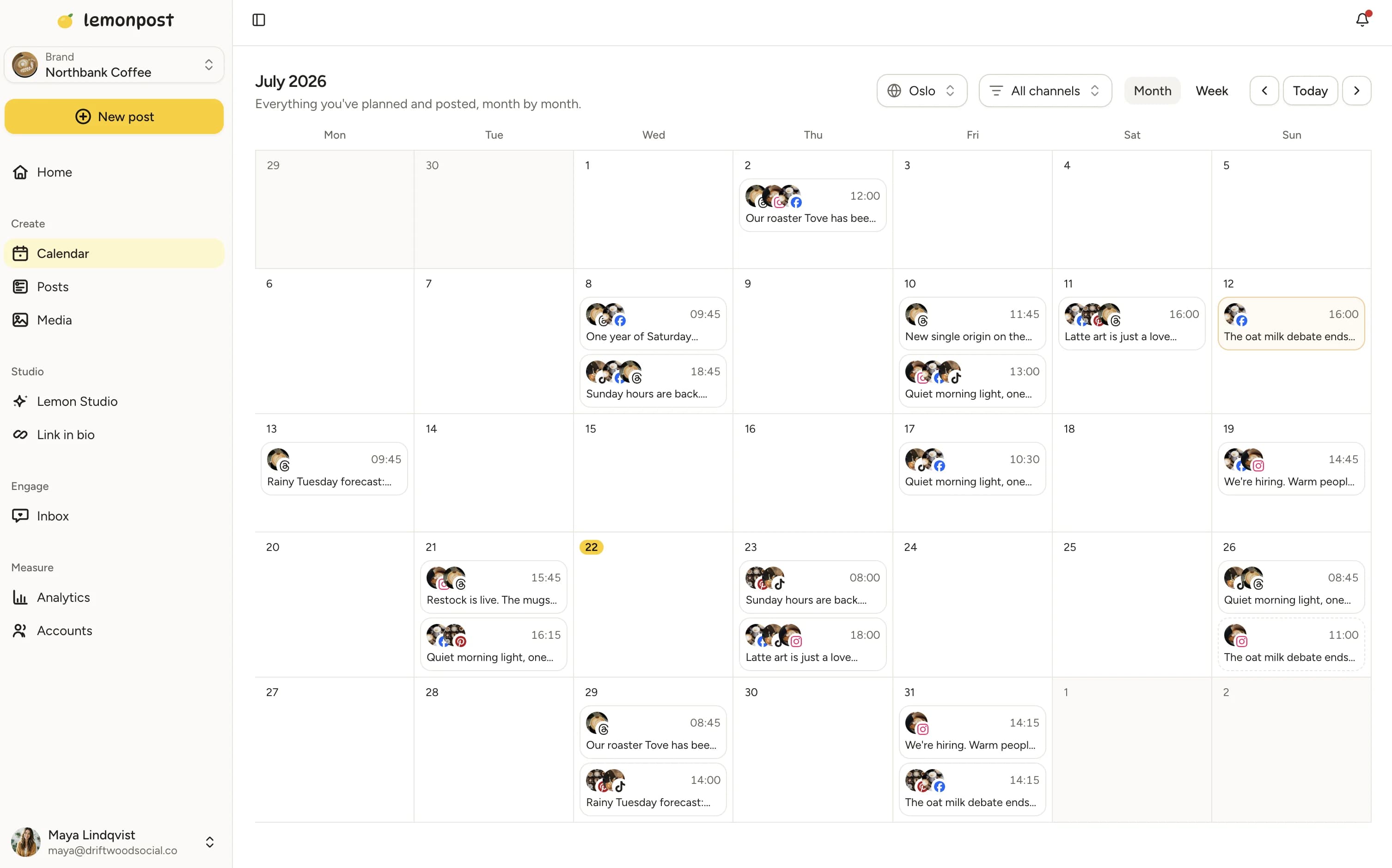
See every platform on one calendar
Month and week views, drag and drop to reschedule, and a posting queue with timezone-aware slots. Gaps are obvious, so you fill them before they happen.
Drag and drop. Move a post to a new day and it's rescheduled. No forms.
Queue it. Set posting times once and new posts slot into the next opening.
Every brand together. All your accounts, and all your clients' accounts, on the same calendar.
Lemon Studio
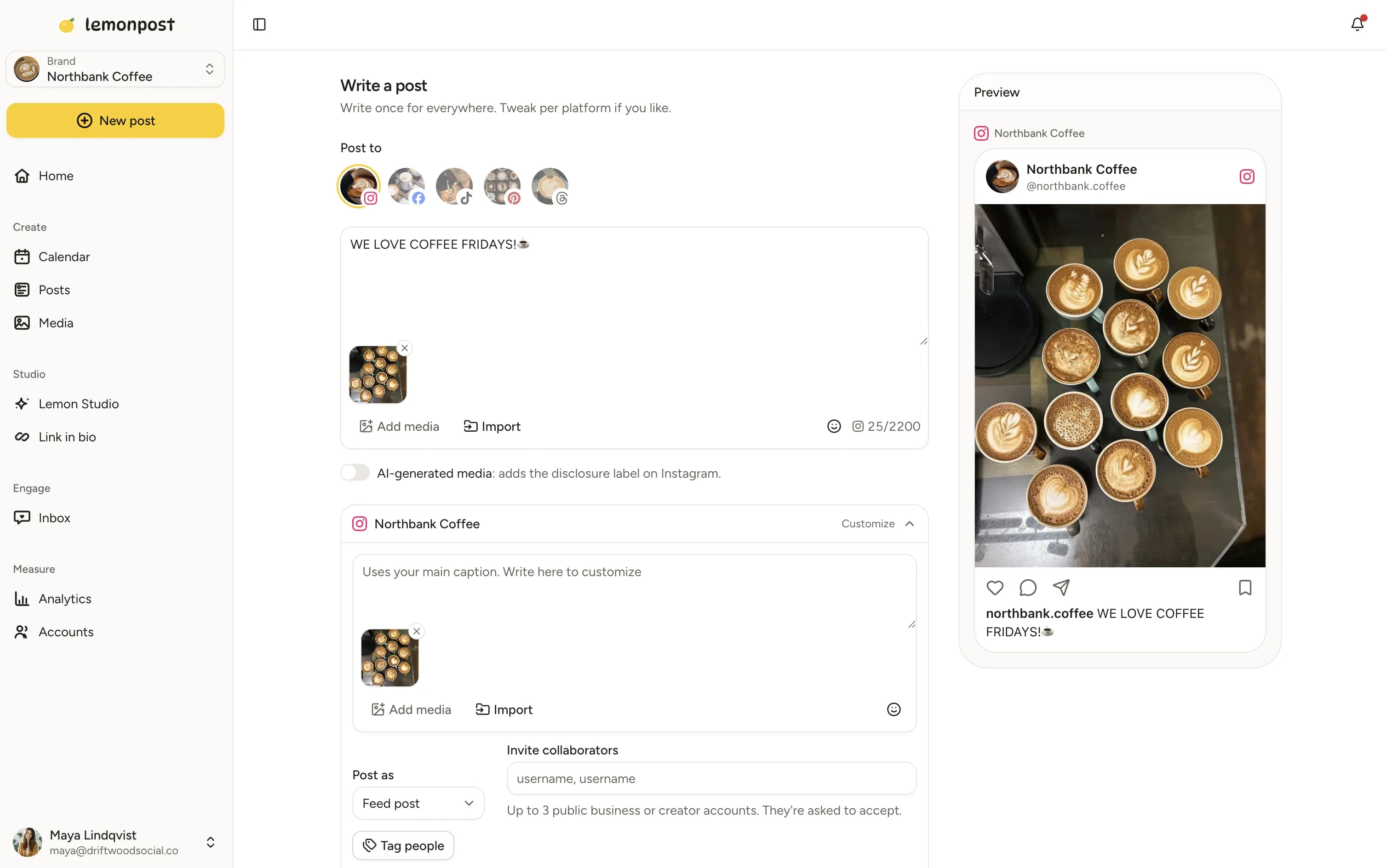
Write once, publish everywhere
Compose one post and send it to nine platforms, each with its own caption if you like. Threads on X, Threads, and Bluesky, carousels within each network's limit, and a scheduled first comment.
Per-platform edits. Different caption, hashtags, media, or first comment for each network.
Checked before it sends. Every post is validated against each platform's rules, so nothing fails at 7 am.
Post from your assistant. Draft and schedule from Claude, ChatGPT, Cursor, or any MCP client.
Approvals
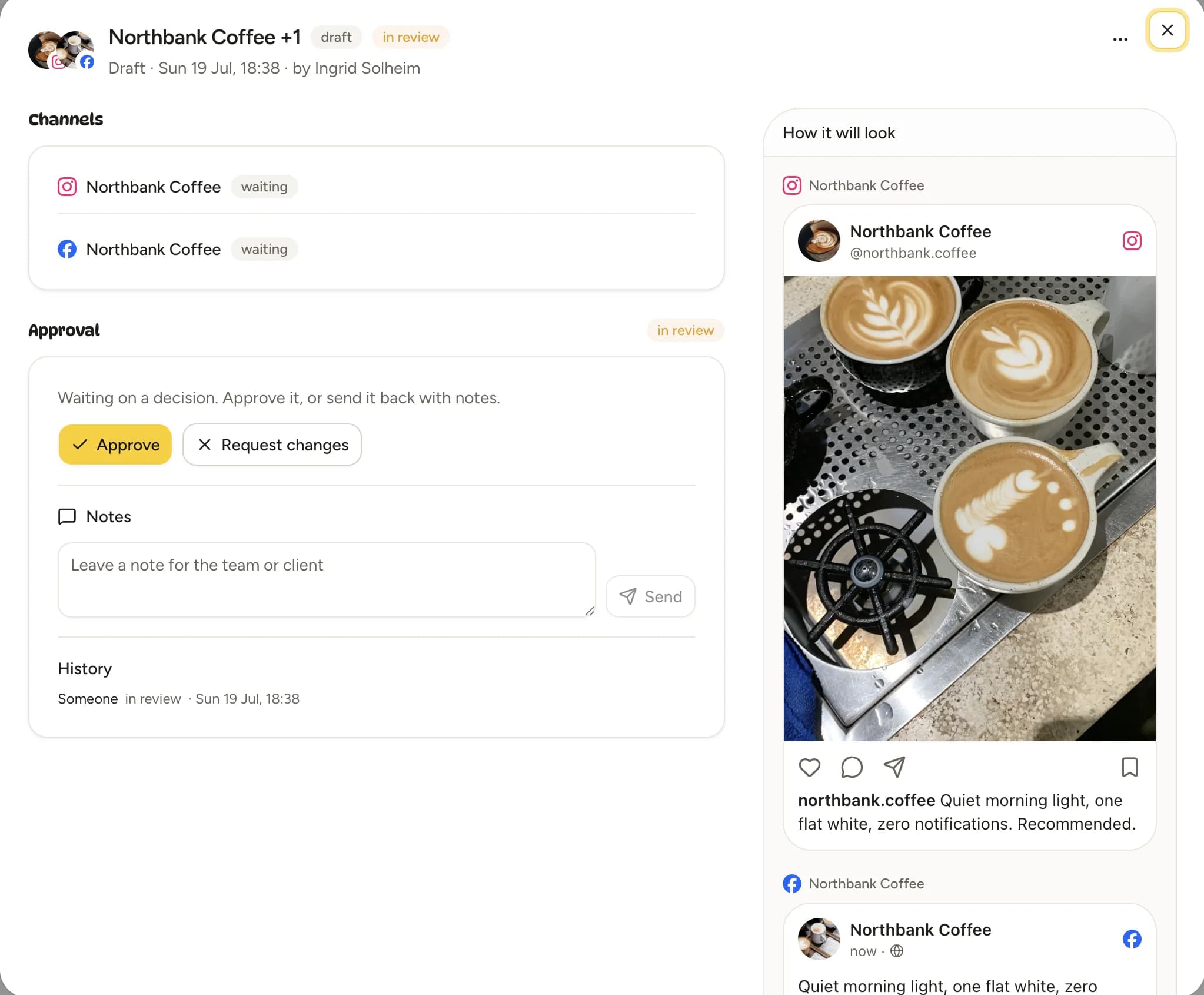
Clients approve from a link, not a login
Set an approval policy per brand and send a review link. The client sees the post as it will appear, taps approve or leaves a note, and nothing publishes until they do.
No client accounts. A review link with an approve toggle, recipient label, and optional expiry.
Enforced, not promised. A post in review can't be scheduled until it's approved.
Logged on the post. Every submit, approval, rejection, and note stays with the post.
What a social media scheduler does, and what to look for
A social media scheduler lets you write posts ahead of time and publish them automatically to your accounts. That sounds small until you count the hours: opening five apps, pasting captions, resizing images, and remembering to do it again on Thursday. Here's how the category works and how to pick one in 2026.
What is a social media scheduler?
A web app that connects to your social accounts through each platform's official API. You create posts in one composer, set a date and time, and the tool publishes them for you. Most also show a calendar of what's planned, pull in analytics, and let a team work on the same accounts. Schedulers differ mostly in which platforms they support, how they charge, and what they add around publishing: approvals, an inbox, reports.
Why schedule instead of posting live
Consistency. Accounts that post on a rhythm grow; accounts that post when someone remembers don't. Batching a week of posts in one sitting takes about an hour, and then the week is done. Scheduling also lets you post at the times your audience is actually online, which is rarely when you're at your desk, and it gives a second person a chance to catch a typo before it's public.
What to look for in 2026
Official API publishing on every platform you use, so posts look and rank exactly like manual ones. Per-platform customization, because the same caption rarely works on LinkedIn and TikTok. A posting queue, not just a date picker. Approvals if anyone signs off on posts, ideally without the approver needing an account. An inbox for comments and DMs, so replies don't mean five apps again. Analytics you'll actually read. And, new this year, a way to post from the AI assistant you already draft in: Lemonpost runs an MCP server so Claude, ChatGPT, or Cursor can schedule through your account.
How schedulers charge: per seat, per channel, per brand
Three models dominate. Per seat (Hootsuite, Sprout Social): every person who logs in is a paid user, from $79 to $399 each per month. Per channel (Buffer): every connected account is a line on the invoice, $5 to $10 each. Per brand or social set (Later, Planoly, Pallyy, Metricool): you pay for each business you manage. Lemonpost prices by channel count in three tiers and never by people: a 12-person agency pays the same as a freelancer on the same channel count. Work out your own shape before comparing prices; the cheapest tool for a solo creator is rarely the cheapest for a team.
Free native schedulers vs a tool
Meta Business Suite schedules Instagram and Facebook for free. TikTok's desktop site schedules up to 10 days ahead. LinkedIn and X have basic scheduling built in. If you post to one platform, once or twice a week, use them. The case for a tool starts when you post to several platforms, work with someone else, or need a calendar, a queue, approvals, or one inbox. That's most businesses and every agency.
How Lemonpost compares
Honest, priced comparisons with the tools people search for. Each one says where the other tool wins, where it costs you, and what a three-person team pays on each.
Who schedules with Lemonpost?
Creators
Batch a week of posts in one sitting, then get back to making things.
Teams
Everyone on one calendar, with approvals when a post needs a second look.
Agencies
Every client in its own workspace, no-login approvals, reports with your logo, no per-seat fees.
Small businesses
Stay active on social in the gaps between running the actual business.
Free social media tools
Loved by customers
Don't just take our word for it
“I looked for this in three other tools before Lemonpost. It just works, erik on support is also amazing.”
Elliot Solberg
Sandra Clothing AS
“We use Lemonpost with claude ai and love it. It is budget friendly, super easy to use and me and my cofounder use it daily.”
Henriette L. Solstad
Lett Rekruttering AS
“In our company it's active recruitment through social media, and being able to post across channels in one place and engage has been amazing.”
Serpios Dento
HomeProject Technologies Ltd
“We were spending HOURS trying to keep up with social media. Lemonpost made it fun again!! Highly recommended :-)”
Vera Bergh
Social media manager
“We manage a busy account and needed something that could take the load without falling over. Lemonpost handles it, and the team ships fixes fast.”
Theo Skyner
CoCreate Ltd
“Connected all our socials in one sitting. The value for money is honestly the best I've found, and support actually replies like a human.”
Ana Costa
“Best quality/price out of all the platforms I've tried.”
Fanny Mäkelä
Social media manager
“We launched a product and got literally zero traffic. It's now been 5 months and we're consistently launching content — and I love the DM feature so we can give our audience some free value.”
Fredrik Kreim
Good to know
Social media scheduling, answered
A tool that connects to your social accounts through their official APIs so you can write posts in advance and have them published automatically at a set time. Most add a calendar, analytics, and team features around that.
Instagram, TikTok, Facebook, LinkedIn, X, YouTube, Pinterest, Threads, and Bluesky, all from one composer, each through its official API.
No. Posts published through a platform's official API are treated exactly like posts made in the app. The myth dates from unofficial tools that broke the rules years ago.
From free for one account with post limits, to several hundred dollars a month per user on enterprise suites. Lemonpost is $29 per month for 5 channels, $99 for 15, and $249 for 40, with unlimited team members on every plan.
Yes. Every Lemonpost plan includes unlimited team members. Plans differ only by how many social accounts you connect.
Yes, on the Growth and Pro plans. Set an approval policy per brand and send a review link; the client approves or leaves a note without creating an account, and the post can't publish until they do.
Yes. Lemonpost runs an MCP server, so Claude, ChatGPT, Codex, Cursor, or any MCP client can draft, schedule, and publish through your account with the same validation and approval rules as the app.
Yes. Upload a CSV with one row per post. Every row is validated before import, and the posts land on your calendar as drafts to review.
Whenever your audience is online, which differs for every account. Lemonpost's analytics build a best-time heatmap from your own posts, per channel, in your timezone.
For Instagram, yes: a Business or Creator account. Facebook needs a Page. Most other platforms work with a normal account. Lemonpost tells you what each platform needs when you connect it.
It stays in your queue marked as failed, with the reason from the platform. The usual cause is an expired connection; reconnect and retry.
Yes. Every plan starts with a 7-day free trial with every feature, and you can cancel anytime.
Fill next week's calendar today
Nine platforms, one composer, unlimited seats. Batch your posts in one sitting and get back to the work that pays.