TikTok scheduler
Schedule TikTok videos and photo posts
Batch a week of TikToks in one sitting. Lemonpost publishes videos and photo posts through TikTok's official API.
7 days free.Cancel anytime.
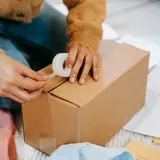
A TikTok video from a candle shop, Packing 40 orders before lunch. A note says it is scheduled for Tue 9:00 AM.
#1 social media tool
Loved by brands and customers 💛












Every TikTok format, scheduled
Videos and photo posts go out on their own, or to your TikTok drafts.
Videos
Vertical videos with a custom cover, so your profile grid stays clean.
Photo carousels
Up to 35 images in one post, with the cover image you pick.
Duet, stitch and comment controls
Choose who can watch, comment, duet, and stitch before you schedule.
The composer with the TikTok tab open: everyone can watch, duets and stitches are allowed, and the video posts directly instead of going to TikTok drafts.

Post one video to TikTok, Reels, and Shorts
Upload it once. Each platform gets its own caption, cover, and settings.
Its own caption per platform
Write a hook for TikTok and a searchable title for YouTube on one screen.
Settings stay per platform
Set duets for TikTok, feed sharing for the Reel, and visibility for the Short.
Checked before it sends
Each version is checked against its platform's rules before it goes out.
One Willow & Flame video scheduled four ways: a TikTok video, an Instagram Reel, a Threads post, and a YouTube Short, each at its own time. A note says it just posted to TikTok.

How to schedule TikTok posts
Connect your TikTok account
Sign in through TikTok's own login. We never see your password.
Create your post
Add a video or photos and a caption, then set who can watch.
Pick a time
Drop it on the calendar or into your queue. It goes out on time.
7 days free.Cancel anytime.
Why schedule TikTok posts in advance?
TikTok rewards accounts that post often, and posting often by hand burns people out fast. Scheduling turns TikTok from a daily scramble into a weekly session: you batch your videos when you have the energy, and Lemonpost handles the publishing.
Volume is the TikTok growth hack
Almost every creator who grew fast on TikTok did it by posting a lot, not by posting one perfect video. The algorithm gives new posts a shot at the For You page constantly, so more shots means more chances to land. A schedule is how you keep the volume up without living inside the app. Batch a week of videos in one sitting and let them go out on their own.
Post when your followers are online
There's no single best time that works for every account. Your best time to post is when your own audience is scrolling, and that's different for a creator in Los Angeles and a shop in Manchester. Lemonpost's analytics shows your best posting times per channel, so you schedule into real windows instead of guessing from generic charts.
No, scheduling doesn't hurt your reach
Posts published through the official TikTok API are treated exactly like posts made in the app. Nothing about scheduling caps your reach. What moves reach is a strong hook, a reason to watch to the end, and posting enough for the algorithm to learn who your video is for. A scheduler helps with the last part and frees up time for the first two.
TikTok sizes and specs, at a glance
What TikTok accepts for video and photo posts. Worth bookmarking.
| Format | Recommended size |
|---|---|
| VideoFull-screen vertical is the standard. You can set a custom cover in Lemonpost. | 1080 × 1920 pxAspect ratio: 9:16 |
| Square videoPlays fine, but leaves black bars on a full-screen phone. | 1080 × 1080 pxAspect ratio: 1:1 |
| Landscape videoBetter repurposed from YouTube than shot for TikTok. | 1920 × 1080 pxAspect ratio: 16:9 |
| Photo postUp to 35 images. Pick the cover and let TikTok add music. | 1080 × 1920 pxAspect ratio: 9:16 or any |
| Video coverThe frame that shows on your profile grid. Set it when you schedule. | 1080 × 1920 pxAspect ratio: 9:16 |
| CaptionRoom for real context. Hashtags count toward the limit. | Up to 2,200 characters |
- File types: MP4 or MOV for video, JPG or WebP for photos.
- Video length: from 3 seconds up to your account's maximum, which Lemonpost reads from TikTok when you connect.
- Branded content and paid partnerships must be disclosed. Lemonpost has the toggles built into the composer.
Post to every platform, not just TikTok
Lemonpost publishes to TikTok, Instagram, YouTube, Facebook, LinkedIn, X, Threads, Bluesky and Pinterest. Turn one video into a TikTok, a Reel and a Short, customize each, and fill nine calendars in the time one used to take.

Who schedules TikTok with Lemonpost?
Creators
Batch a week of videos in one sitting, then get back to filming instead of uploading.
Agencies
Every client's TikTok in one place, with approvals on Growth and Pro.
Small businesses
Keep your TikTok active in the gaps between running the actual business.
TikTok scheduling, answered
How do I schedule TikTok posts in advance?
Connect your TikTok account, upload your video or photos in Lemonpost, write your caption, and pick a date and time. Lemonpost publishes it automatically through the official TikTok API. You can schedule days, weeks, or months ahead, as far out as you like to plan.
Can I schedule TikTok photo posts, not just videos?
Yes. Lemonpost schedules both videos and photo carousels with up to 35 images. You pick which image is the cover, and you can let TikTok add recommended music.
Is it safe to use a TikTok scheduler?
It is when the tool publishes through TikTok's official Content Posting API, which Lemonpost does. You connect through TikTok's own login, we never ask for your password, and scheduled posts follow the same rules as posts made in the app.
Does scheduling TikToks hurt my reach or the algorithm?
No. Posts published through the official API are treated exactly like posts made by hand in the app. If anything, scheduling helps, because posting consistently gives the algorithm more chances to find the right audience for your videos.
Can I set duet, stitch and comment permissions?
Yes. Before you schedule, choose who can duet, stitch and comment on the post, and set the privacy level from public to followers to private. Lemonpost reads the options your account allows straight from TikTok.
Can I schedule a TikTok as a draft instead of publishing it?
Yes. Instead of auto-publishing, you can send a post to your TikTok inbox as a draft. You finish it in the TikTok app and post it yourself, which is handy when you want the last word before it goes live.
What's the best time to post on TikTok?
Whenever your audience is online, which is different for every account. Lemonpost builds a best-time heatmap from your own posts on each channel. For starting windows by weekday, see our TikTok posting times guide.
Can I manage multiple TikTok accounts?
Yes, one per brand. Each brand connects one TikTok account, so a second account gets its own brand, and every plan includes unlimited brands and seats. Plans count connected accounts across all platforms: 5 on Creator, 15 on Growth, and 40 on Pro.
Can I post the same video to TikTok, Reels and YouTube Shorts?
Yes. Upload the video once in the composer, then send it to TikTok, Instagram Reels and YouTube Shorts in one go, each with its own caption, cover and settings.
How do I disclose branded content or a paid partnership?
TikTok requires it, and Lemonpost has the toggles in the composer. Mark a post as branded content or a paid partnership when you schedule it, and Lemonpost sends the disclosure with the post.
Can I try Lemonpost for free?
Yes. Every plan starts with a 7-day free trial, and you can cancel anytime. Plans start at $29 a month, you pay for connected accounts, and seats are unlimited on every plan.
Can I schedule TikToks from my phone?
Yes. Lemonpost runs in your browser and installs on your phone like a regular app. And since publishing happens on our servers, your phone doesn't need to be on when the post goes out.
What happens if a scheduled TikTok fails?
It stays on your calendar marked as failed, with the reason from TikTok, and we email you so you can fix it and try again. If you posted to several platforms and one fails, the others still go out.
Fill next week's TikTok calendar today
Batch your videos and photo posts in one sitting, and Lemonpost publishes them on time.
- 7 days free
- Cancel in Settings, no call
- Unlimited seats on every plan